
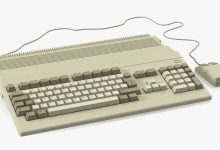
A keyboard is a primary input device that allows users to interact with a computer by typing characters, numbers, and executing commands. It translates physical key presses into digital signals that the computer processes. The keyboard originated from Christopher Latham Sholes’ typewriter in 1868, introducing the QWERTY layout. Types of Keyboards Type Description Use Case Mechanical Uses physical switches under each key; tactile and durable Gaming, professional typing Membrane Uses pressure pads; quieter, cheaper Everyday office work Laptop Keyboard Integrated, low-profile keys (scissor-switch or chiclet style) Portable computing Wireless Connects via Bluetooth or RF dongle Mobility, clutter-free setups Ergonomic Split or curved design to reduce strain Long typing sessions Gaming Keyboards Mechanical switches, RGB lighting, macro keys Gamers, streamers Virtual/On-Screen Software-based, touch...
A mouse is a hand‑held pointing device that lets users interact with a computer’s graphical interface. It translates physical movement into cursor movement on the screen and provides buttons for selection, dragging, and commands. The computer mouse was invented by Douglas Engelbart in 1964, first shown in the 1968 “Mother of All Demos.” Types of Computer Mice Type Description Use Case Mechanical (Ball Mouse) Uses a rubber ball to detect movement Early PCs (1980s–1990s) Optical Mouse Uses LED light and sensors to track movement Standard modern desktops Laser Mouse More precise than optical; works on more surfaces Gaming, design work Wireless Mouse Connects via RF dongle or Bluetooth Laptops, portable setups Trackball Mouse Ball controlled by fingers/thumb Ergonomic, specialized tasks Gaming Mouse...
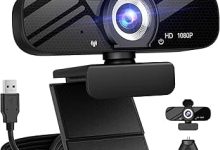
A webcam is a digital video camera, often built into laptops or attached externally via USB, that captures real-time video and transmits it to a computer. It’s widely used for video calls, streaming, recording, and security monitoring.The webcam was first developed at Cambridge University in 1991 to monitor a coffee pot. Types of Webcams Type Description Common Use Built-in Webcam Integrated into laptops, tablets, or monitors Everyday video calls External USB Webcam Standalone device connected via USB Higher quality video, streaming IP Webcam Network-connected camera with its own IP address Security, surveillance Conference Webcam Wide-angle, often with microphones Business meetings, group calls Streaming Webcam High resolution (1080p/4K), high FPS Twitch, YouTube, gaming streams Key Features Brief History
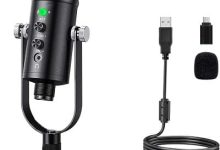
A microphone is a transducer that converts sound waves (acoustic energy) into electrical signals. In computers, microphones capture voice or audio for communication, recording, streaming, and voice recognition. The microphone was first created by Emile Berliner in 1877 as a carbon button microphone. Types of Microphones Type Description Common Use Dynamic Microphone Uses a moving coil; durable, handles loud sounds Live performances, broadcasting Condenser Microphone Uses a charged diaphragm; sensitive, wide frequency response Studio recording, streaming Ribbon Microphone Uses a thin ribbon; warm sound, fragile Vintage recording, specialized studios Electret Condenser Miniaturized condenser mic; low cost Built-in laptop/phone mics USB Microphone Plug-and-play digital mic Podcasting, online meetings Wireless Microphone Transmits audio via RF/Bluetooth Stage, presentations Lavalier (Clip-on) Small, wearable mic Interviews, presentations Shotgun Microphone Highly...
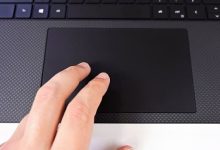
A touchpad (also called a trackpad) is a flat, touch‑sensitive surface that detects finger movement and translates it into cursor movement on the screen. It replaces or complements the mouse in portable computers. How It Works Types of Touchpads Type Description Example Use Basic Touchpad Single‑finger movement, simple clicks Early laptops Multi‑touch Touchpad Supports gestures (scroll, zoom, swipe) Modern laptops (Windows Precision Touchpad, Apple trackpad) Clickable Touchpad Entire pad acts as a button MacBook trackpads External Touchpad USB/Bluetooth device, separate from laptop Desktop setups needing touch input Brief History
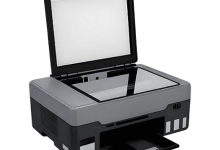
A scanner is a device that converts physical documents, images, or objects into digital data. It captures visual information and translates it into a format that computers can store, edit, and share. Types of Scanners Key Features Brief History Trends in Scanner Technology (2025+)
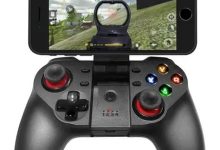
A joystick or game controller is a hand‑held input device used to control movement or actions in video games, simulators, and certain computer applications. It translates physical motion (tilting, pressing buttons, moving sticks) into digital signals. 1 Brief History Types of Controllers / Joysticks Trends in Controller Technology
A barcode reader (or scanner) is a device that captures and decodes printed barcodes into digital data that a computer can process. It’s widely used in retail, logistics, healthcare, and inventory management. History and Inventors How It Works Modern Developments
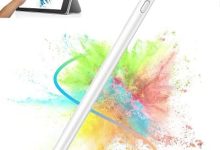
A stylus is a pen‑like input device used to write, draw, or interact directly with a computer screen, graphics tablet, or touchscreen. It allows precise control compared to a finger, especially for design, handwriting, and art applications. Computer Input Device
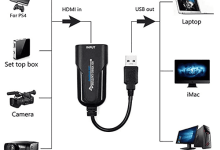
A capture card acts as a bridge between a video source and your computer. It takes the HDMI (or other video signal) from a console, camera, or DVD player, converts it into a digital format, and sends it to your PC via USB or PCIe. This allows you to record or broadcast high-quality video without relying on your computer’s built-in screen recording. Key Features Common Uses Example Products Things to Consider
The Visual Interface of Computing A monitor is the primary output device of a computer, displaying information in visual form. It allows users to interact with software through graphical interfaces, making computing accessible and intuitive. From bulky cathode-ray tube (CRT) displays to sleek high-resolution flat panels, monitors have evolved alongside computers to deliver sharper, faster, and more immersive visuals. Historical Background Architecture and Features Modern monitors are designed to balance clarity, speed, and ergonomics. Types of Monitors Type Description Standard LCD Affordable, general-purpose displays for everyday computing. Gaming Monitor High refresh rates (144–240 Hz), adaptive sync (G-Sync/FreeSync). Professional Monitor High color accuracy for design, photography, and video editing. Ultrawide Monitor Extended aspect ratio for multitasking and immersive experiences. Portable Monitor Lightweight, USB-powered...
Bringing Sound to Computing A speaker is an output device that converts electrical signals into audible sound. In computing, speakers allow users to hear audio from applications, games, videos, and communication tools. They transform digital information into a sensory experience, making computers not only visual but also auditory machines. This idea is beautifully captured in a famous line from the Hong Kong film Infernal Affairs (2002): “Highs are sweet, mids are accurate, lows are deep — in short, the sound is transparent.” (Original Chinese: 高音甜,中音准,低音沉,总之一句话,就是通透). Historical Background Architecture and Features Speakers vary widely in design, but most share common components: Trends and Future Outlook
 seseltan



Latest Comments
666