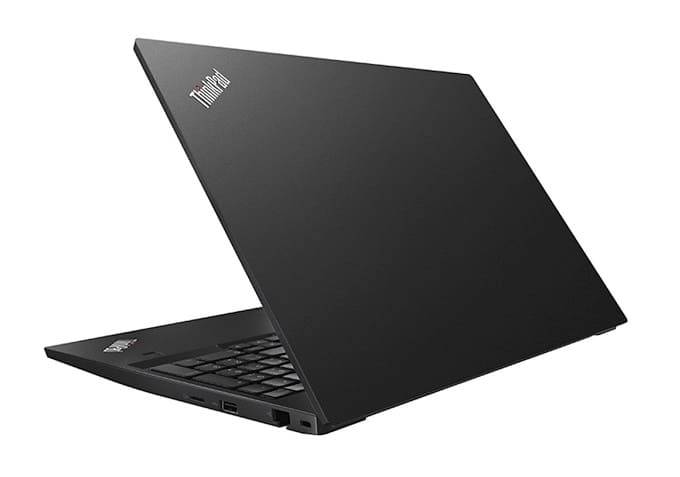
The Lenovo ThinkPad E590 is a 15.6-inch mid-range business laptop released in late 2018, offering 8th Gen Intel Core i3/i5/i7 processors, up to 32 GB DDR4 RAM, and SSD storage. It’s designed for professionals and students who need a reliable, durable machine for productivity, with enough power for light gaming like Roblox or Minecraft.
Key Specifications
- Display: 15.6-inch Full HD (1920×1080), IPS panel, LED backlight
- Processor Options:
- Intel Core i3-8145U (2 cores, 4 threads, up to 3.9 GHz)
- Intel Core i5-8265U (4 cores, 8 threads, up to 3.9 GHz)
- Intel Core i7-8565U (4 cores, 8 threads, up to 4.6 GHz)
- Graphics: Integrated Intel UHD Graphics 620
- Memory: Up to 32 GB DDR4-2400
- Storage: 500 GB HDD or SSD options up to 512 GB NVMe
- Battery: 45 Wh or 52.5 Wh, ~7–10 hours runtime
- Weight: ~2.12 kg (4.68 lbs)
- Build: Aluminum lid, PC/ABS plastic bottom, available in black or silver
Connectivity & Ports
- USB: 2 × USB 3.1 Gen 1, 1 × USB 2.0, 1 × USB-C (Power Delivery + DisplayPort)
- Video Output: HDMI 1.4b
- Networking: Gigabit Ethernet, Wi-Fi 802.11ac, Bluetooth 4.2
- Other: MicroSD card reader, headphone/mic combo jack, optional docking connector
What Can It Do?
- Office & Productivity: Excellent for multitasking with Microsoft Office, Google Workspace, and video conferencing.
- Media: Streams Full HD video smoothly (Netflix, YouTube).
- Light Gaming:
- Runs Roblox, Minecraft, League of Legends, and CS:GO at low-to-medium settings.
- Not suitable for modern AAA games due to integrated graphics.
- Business Use: Strong ThinkPad keyboard, enterprise durability, and TPM security features make it reliable for professionals.
Pros & Cons
| Pros | Cons |
|---|---|
| Durable ThinkPad build with aluminum lid | No discrete GPU option |
| Expandable RAM up to 32 GB | Heavier than ultrabooks (~2.1 kg) |
| Good port selection including USB-C | Battery life is average compared to newer models |
| Affordable compared to premium ThinkPads | Display brightness is modest |
Verdict
The Lenovo ThinkPad E590 is best suited for students, office workers, and small businesses who need a reliable laptop for productivity and light entertainment. It can comfortably handle Roblox, Minecraft, and other lightweight games, but its real strength lies in business tasks, multitasking, and secure enterprise environments. Upgrading to an SSD and maximizing RAM will make it much more responsive for modern workloads.


Must log in before commenting!
Sign In Sign Up