A switch is a networking device that connects multiple devices (computers, printers, servers) within the same Local Area Network (LAN) and forwards data intelligently based on MAC addresses.
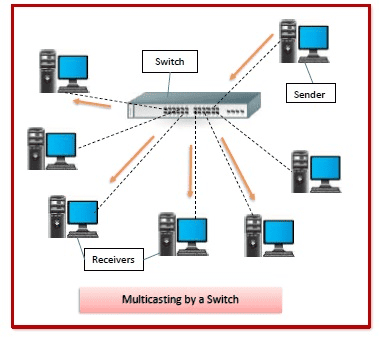
How It Works
- Operates at Layer 2 (Data Link) of the OSI model.
- Each port on the switch learns the MAC address of the device connected to it.
- When a packet arrives, the switch looks up the destination MAC in its MAC address table and forwards the packet only to the correct port.
- This makes communication faster and reduces unnecessary traffic compared to older hubs (which broadcast to all ports).
Types of Switches
- Unmanaged switch:
- Plug‑and‑play, no configuration needed.
- Common in small home/office setups.
- Managed switch:
- Configurable (VLANs, QoS, monitoring).
- Used in enterprise networks.
- Layer 3 switch:
- Combines switching (Layer 2) with routing (Layer 3).
- Can make IP‑based forwarding decisions like a router.
Key Functions
- MAC learning: Builds a table of MAC addresses and ports.
- Forwarding/filtering: Sends packets only to the correct destination port.
- Broadcast control: Limits unnecessary traffic.
- VLAN support (in managed switches): Segments a LAN into smaller logical networks.
Switch vs Router vs Hub
| Device | Role | Layer | Example |
| Switch | Connects devices within a LAN, forwards by MAC | Layer 2 | Office PCs connected together |
| Router | Connects different networks, forwards by IP | Layer 3 | Home LAN to Internet |
-=||=-FavoriteLike (0)


Must log in before commenting!
Sign In Sign Up