IP Address
- Definition: An IP (Internet Protocol) address is a unique numerical identifier for a device on a network.
- Types:
- IPv4: 32‑bit, written as four numbers (e.g., 192.168.1.1).
- IPv6: 128‑bit, written in hexadecimal (e.g., 2001:0db8:85a3::8a2e:0370:7334).
- Role: Machines use IP addresses to locate and communicate with each other.
- Problem: Numbers are hard for humans to remember.
Domain Name
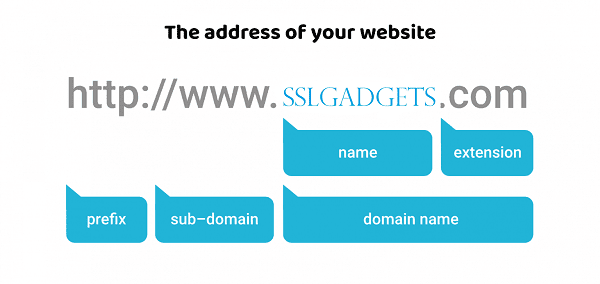
- Definition: A domain name is a human‑friendly label that maps to an IP address.
- Examples:
- google.com → maps to an IP like 142.250.190.14.
- microsoft.com → maps to an IP like 20.81.111.85.
- Structure:
- Top‑Level Domain (TLD): .com, .org, .net, .cn, etc.
- Second‑Level Domain: google, microsoft.
- Subdomain: mail.google.com, docs.microsoft.com.
- Role: Makes the Internet easier to use by replacing numbers with names.
DNS (Domain Name System)
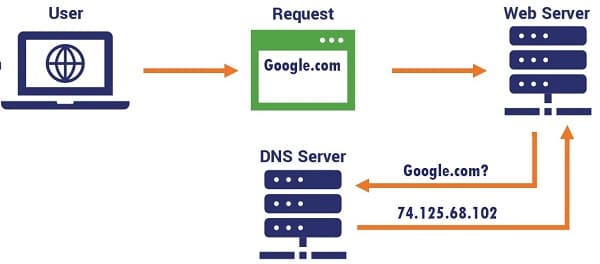
- Definition: DNS is the “phonebook of the Internet”, translating domain names into IP addresses.
- How it works:
- You type www.example.com in your browser.
- Your computer asks a DNS resolver for the IP.
- The resolver queries DNS servers (root → TLD → authoritative).
- The IP address is returned (e.g., 93.184.216.34).
- Your browser connects to that IP.
- Key Components:
- Root servers: Handle top‑level domains.
- TLD servers: Handle .com, .org, etc.
- Authoritative servers: Store actual domain‑to‑IP mappings.
- Caching: DNS results are cached locally and by ISPs to speed up lookups.
Relationship Between Them
- IP: The actual numeric address of a device.
- Domain: A human‑readable name pointing to that IP.
- DNS: The system that translates between the two.
Example:
- You type www.microsoft.com.
- DNS finds its IP (e.g., 20.81.111.85).
- Your browser connects to that IP, and the website loads.
Summary
- IP = numeric identifier.
- Domain = human‑friendly name.
- DNS = translator between domain and IP. Together, they make the Internet usable for both machines and humans.
-=||=-FavoriteLike (0)



Must log in before commenting!
Sign In Sign Up