IP Address
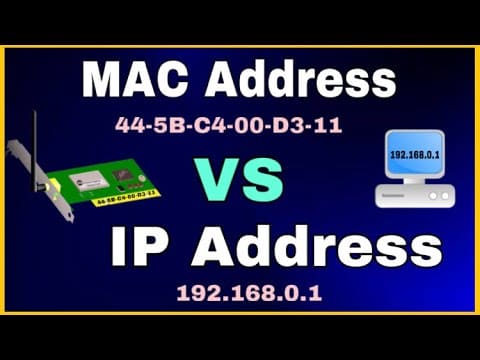
- Definition: A logical identifier assigned to a device in a network (IPv4 or IPv6).
- Role: Used for communication across networks.
- Changeable: Can be reassigned (static or dynamic via DHCP).
MAC Address
- Definition: A Media Access Control (MAC) address is a unique hardware identifier burned into a network interface card (NIC).
- Format: 48‑bit hexadecimal (e.g., 00:1A:2B:3C:4D:5E).
- Role: Used at the data link layer to physically identify a device on a local network.
- Permanent: Usually fixed to the hardware (though it can be spoofed).
IP–MAC Binding
- Definition: The process of associating a specific IP address with a specific MAC address.
- Purpose: Ensures that a device always gets the same IP address, and prevents IP conflicts or spoofing.
- How it works:
- In DHCP servers, you can create a reservation: when a device with MAC 00:1A:2B:3C:4D:5E connects, it always receives IP 192.168.1.100.
- In routers, IP–MAC binding can also be used as a security feature to prevent unauthorized devices from claiming an IP.
Example
- Home network: Router binds your printer’s MAC address to IP 192.168.1.50, so it’s always reachable at that address.
- Enterprise network: DHCP server reserves IPs for critical servers based on their MAC addresses.
- Security setup: Router blocks traffic if a device tries to use an IP not bound to its MAC.
Benefits
- Consistency: Devices like printers, servers, or cameras always have the same IP.
- Security: Prevents IP spoofing (a malicious device pretending to be another).
- Network stability: Avoids IP conflicts in DHCP environments.
- Access control: Admins can restrict which MAC addresses are allowed to use certain IPs.
Summary
- IP address = logical, can change.
- MAC address = physical, unique to hardware.
- IP–MAC binding = ties them together for consistency and security. It’s widely used in DHCP reservations and router security features.
-=||=-FavoriteLike (0)



Must log in before commenting!
Sign In Sign Up