A keyboard is a primary input device that allows users to interact with a computer by typing characters, numbers, and executing commands. It translates physical key presses into digital signals that the computer processes. The keyboard originated from Christopher Latham Sholes’ typewriter in 1868, introducing the QWERTY layout.
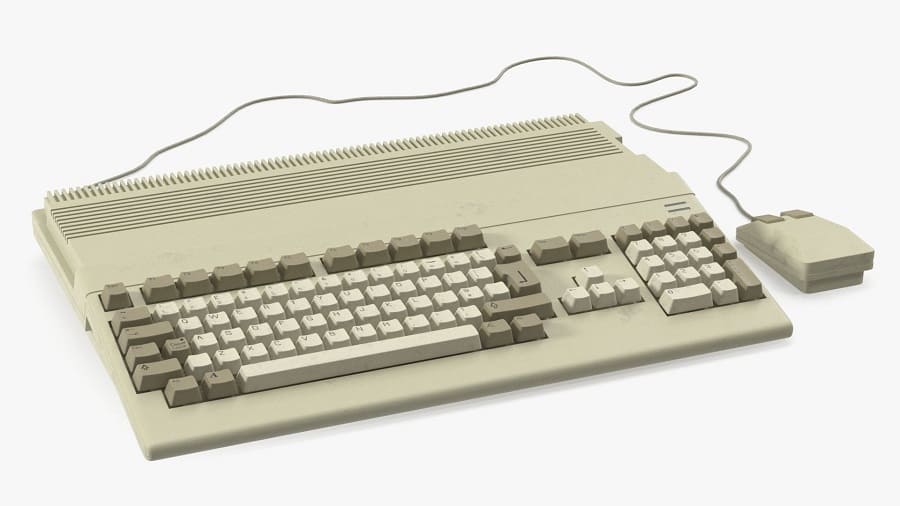
Types of Keyboards
| Type | Description | Use Case |
| Mechanical | Uses physical switches under each key; tactile and durable | Gaming, professional typing |
| Membrane | Uses pressure pads; quieter, cheaper | Everyday office work |
| Laptop Keyboard | Integrated, low-profile keys (scissor-switch or chiclet style) | Portable computing |
| Wireless | Connects via Bluetooth or RF dongle | Mobility, clutter-free setups |
| Ergonomic | Split or curved design to reduce strain | Long typing sessions |
| Gaming Keyboards | Mechanical switches, RGB lighting, macro keys | Gamers, streamers |
| Virtual/On-Screen | Software-based, touch input | Tablets, smartphones |
Key Features
- Layout: QWERTY is standard; alternatives include AZERTY, DVORAK.
- Function Keys (F1–F12): Shortcuts for system and application commands.
- Modifier Keys: Shift, Ctrl, Alt, Command — used in combinations.
- Numeric Keypad: For fast number entry (often absent in compact keyboards).
- Backlighting: LED or RGB for visibility and aesthetics.
- Switch Types (mechanical):
- Cherry MX Blue (clicky, tactile)
- Cherry MX Red (linear, smooth)
- Brown (tactile, quiet)
System Architecture
- Connects via USB, PS/2, or wireless protocols.
- Communicates with the OS input subsystem.
- Supports shortcuts, macros, and hotkeys for productivity.
Development History — Key Milestones
- 1868 → First practical typewriter (Sholes & Glidden), QWERTY layout introduced.
- 1920s–1930s → Teletype machines: typewriter mechanics + electronic signals, early computer input.
- 1950s–1970s → Computer terminals replace punch cards; keyboards become electronic.
- 1980s → IBM Model M (mechanical, durable, tactile) sets PC keyboard standard.
- 1990s–2000s → Membrane keyboards dominate (cheaper, quieter); laptops adopt chiclet/scissor-switch.
- 2010s–2020s → Mechanical keyboards return (Cherry MX, RGB, gaming focus); wireless & virtual keyboards spread.
- Future → Optical/magnetic switches, AI-driven layouts, foldable/flexible designs, voice/gesture input complement typing.
Language Versions (Layouts)
| Layout | Language/Region | Notes |
| QWERTY | English (US, UK, international) | Originated from typewriter design; most widely used globally |
| AZERTY | French (France, Belgium) | Rearranges A/Q and Z/W keys; adapted for French typing |
| QWERTZ | German-speaking countries (Germany, Austria, Switzerland) | Swaps Y and Z; supports umlauts (ä, ö, ü) |
| JIS Layout | Japanese | Includes extra keys for kana input and conversion |
| Hangul Keyboard | Korean | Supports Hangul syllable composition |
| Zhuyin / Pinyin Layouts | Chinese (Taiwan, Mainland China) | Input methods for Chinese characters |
| Cyrillic Layouts | Russian, Eastern Europe | Supports Cyrillic alphabet; often dual-language keyboards |
| Arabic Keyboard | Middle East | Right-to-left script support |
| Other Regional Variants | Spanish, Portuguese, Turkish, etc. | Adapted for diacritics and special characters |
-=||=-FavoriteLike (0)



Must log in before commenting!
Sign In Sign Up