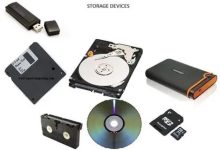
Categories of Storage Primary Storage (Volatile) Secondary Storage (Non-Volatile) Tertiary & Offline Storage Cloud Storage Key Characteristics Feature HDD SSD RAM Cloud Volatility Non-volatile Non-volatile Volatile Non-volatile Speed Slow (100 MB/s) Fast (500 MB/s–7 GB/s) Very fast (10–100 GB/s) Depends on internet Cost per GB Low Medium–High High Subscription-based Durability Mechanical wear No moving parts Not for storage Depends on provider Use Case Mass storage OS, apps, games Active processing Backup, sync, access anywhere Storage Hierarchy (Fastest to Slowest) Storage Capacity Units
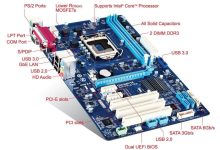
A motherboard is the main printed circuit board (PCB) in a computer. It connects and allows communication between the CPU, RAM, storage, GPU, power supply, and peripheral devices. It also houses the chipset, which controls data flow between components. Key Components on a Motherboard Component Function CPU Socket Holds the processor (e.g., LGA1700 for Intel, AM5 for AMD) RAM Slots (DIMM) Install system memory (DDR3/4/5) Chipset (PCH) Manages communication between CPU, RAM, storage, USB, etc. Power Connectors ATX 24-pin (main), 8-pin (CPU), others for GPU PCIe Slots For GPUs, SSDs, sound/network cards M.2 / SATA Ports For SSDs and HDDs BIOS/UEFI Chip Firmware that initializes hardware and loads the OS VRMs (Voltage Regulator Modules) Regulate power to CPU and memory I/O Ports USB,...
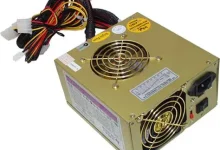
A Power Supply Unit (PSU) converts AC (alternating current) from the wall outlet into regulated DC (direct current) voltages required by computer components. It distributes power to the motherboard, CPU, GPU, drives, fans, and peripherals. The power supply unit (PSU) evolved with early electronic computers in the 1950s, standardized later with IBM PCs. Key Functions PSU Connectors Connector Purpose 24-pin ATX Main motherboard power 8-pin EPS (CPU) Powers CPU VRMs 6/8-pin PCIe Powers discrete GPUs SATA Power SSDs, HDDs, optical drives Molex Legacy devices, fans, accessories 12VHPWR (ATX 3.0) High-power GPUs (e.g., RTX 40 series) PSU Form Factors Type Description ATX Standard for desktops SFX / SFX-L Compact for small form factor builds TFX / Flex ATX Used in slim or embedded...
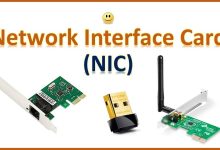
A Network Interface Card (NIC) is a hardware component that enables a computer or device to connect to a network. It provides the physical and logical interface for sending and receiving data over LANs (Local Area Networks), WANs (Wide Area Networks), or the internet. The network interface card (NIC) grew out of Ethernet, invented by Robert Metcalfe at Xerox PARC in 1973. Types of NICs Type Description Use Case Ethernet NIC Wired connection via RJ-45 port; supports 10/100/1000 Mbps or 2.5G/5G/10G+ Desktops, servers, routers Wireless NIC (Wi-Fi) Connects to wireless networks (802.11a/b/g/n/ac/ax/be) Laptops, tablets, mobile devices Fiber NIC Uses SFP/SFP+ or QSFP ports for fiber-optic links Data centers, high-speed servers Virtual NIC Software-defined NICs in virtual machines Cloud computing, virtualization Thunderbolt/USB NIC...
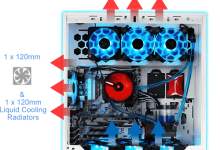
A cooling system in a computer manages heat generated by components like the CPU, GPU, VRMs, and storage. Without proper cooling, these parts can throttle performance, crash, or suffer permanent damage. Types of Cooling Systems Type Description Use Case Air Cooling Uses heatsinks and fans to dissipate heat Most desktops and laptops Liquid Cooling (AIO/Custom Loop) Circulates coolant through a loop to transfer heat to a radiator High-performance PCs, overclocking Passive Cooling No fans; relies on heat sinks and airflow Silent systems, embedded devices Vapor Chamber Flat heat spreader using phase-change cooling High-end GPUs, gaming laptops Thermoelectric (Peltier) Uses electric current to move heat Experimental or niche cooling Immersion Cooling Hardware submerged in non-conductive fluid Data centers, extreme HPC setups Key Components in...
What Is BIOS? BIOS stands for Basic Input/Output System. It’s low-level firmware stored on a chip on the motherboard that initializes hardware during the boot process and hands control over to the operating system.The BIOS concept was introduced by Gary Kildall in 1975 as part of his CP/M operating system. Key Functions of BIOS Function Description POST (Power-On Self Test) Checks CPU, RAM, GPU, and storage for basic functionality Boot Loader Locates and launches the OS from a bootable device Hardware Initialization Sets up memory, CPU, chipset, and peripherals CMOS Settings Stores user-configurable settings like boot order, fan curves, and voltages BIOS Setup Utility User interface to configure system settings (accessed via key like F2/DEL) BIOS Settings You Can Configure BIOS Updates...
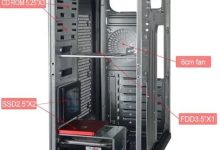
A computer case (also called a chassis) is the structural frame that holds the motherboard, power supply, storage drives, cooling systems, and expansion cards. It provides physical protection, airflow management, and mounting points for all components. The computer case or chassis became standardized in the 1970s–1980s, with the ATX form factor introduced in 1995. Common Case Form Factors Form Factor Description Fits Motherboard Types Full Tower Large, spacious, supports multiple GPUs, radiators, and drives E-ATX, ATX, mATX Mid Tower Most common size; good balance of space and airflow ATX, mATX, Mini-ITX Mini Tower Compact, limited expansion, budget builds mATX, Mini-ITX Small Form Factor (SFF) Ultra-compact, portable, space-saving Mini-ITX Open Frame / Test Bench Exposed layout for easy access and cooling Any (custom fit)...
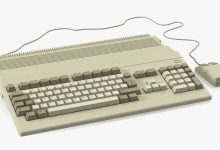
A keyboard is a primary input device that allows users to interact with a computer by typing characters, numbers, and executing commands. It translates physical key presses into digital signals that the computer processes. The keyboard originated from Christopher Latham Sholes’ typewriter in 1868, introducing the QWERTY layout. Types of Keyboards Type Description Use Case Mechanical Uses physical switches under each key; tactile and durable Gaming, professional typing Membrane Uses pressure pads; quieter, cheaper Everyday office work Laptop Keyboard Integrated, low-profile keys (scissor-switch or chiclet style) Portable computing Wireless Connects via Bluetooth or RF dongle Mobility, clutter-free setups Ergonomic Split or curved design to reduce strain Long typing sessions Gaming Keyboards Mechanical switches, RGB lighting, macro keys Gamers, streamers Virtual/On-Screen Software-based, touch...
A mouse is a hand‑held pointing device that lets users interact with a computer’s graphical interface. It translates physical movement into cursor movement on the screen and provides buttons for selection, dragging, and commands. The computer mouse was invented by Douglas Engelbart in 1964, first shown in the 1968 “Mother of All Demos.” Types of Computer Mice Type Description Use Case Mechanical (Ball Mouse) Uses a rubber ball to detect movement Early PCs (1980s–1990s) Optical Mouse Uses LED light and sensors to track movement Standard modern desktops Laser Mouse More precise than optical; works on more surfaces Gaming, design work Wireless Mouse Connects via RF dongle or Bluetooth Laptops, portable setups Trackball Mouse Ball controlled by fingers/thumb Ergonomic, specialized tasks Gaming Mouse...
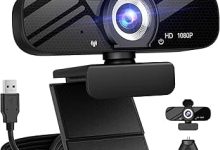
A webcam is a digital video camera, often built into laptops or attached externally via USB, that captures real-time video and transmits it to a computer. It’s widely used for video calls, streaming, recording, and security monitoring.The webcam was first developed at Cambridge University in 1991 to monitor a coffee pot. Types of Webcams Type Description Common Use Built-in Webcam Integrated into laptops, tablets, or monitors Everyday video calls External USB Webcam Standalone device connected via USB Higher quality video, streaming IP Webcam Network-connected camera with its own IP address Security, surveillance Conference Webcam Wide-angle, often with microphones Business meetings, group calls Streaming Webcam High resolution (1080p/4K), high FPS Twitch, YouTube, gaming streams Key Features Brief History
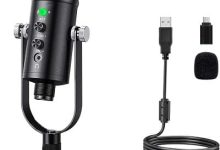
A microphone is a transducer that converts sound waves (acoustic energy) into electrical signals. In computers, microphones capture voice or audio for communication, recording, streaming, and voice recognition. The microphone was first created by Emile Berliner in 1877 as a carbon button microphone. Types of Microphones Type Description Common Use Dynamic Microphone Uses a moving coil; durable, handles loud sounds Live performances, broadcasting Condenser Microphone Uses a charged diaphragm; sensitive, wide frequency response Studio recording, streaming Ribbon Microphone Uses a thin ribbon; warm sound, fragile Vintage recording, specialized studios Electret Condenser Miniaturized condenser mic; low cost Built-in laptop/phone mics USB Microphone Plug-and-play digital mic Podcasting, online meetings Wireless Microphone Transmits audio via RF/Bluetooth Stage, presentations Lavalier (Clip-on) Small, wearable mic Interviews, presentations Shotgun Microphone Highly...
A touchpad (also called a trackpad) is a flat, touch‑sensitive surface that detects finger movement and translates it into cursor movement on the screen. It replaces or complements the mouse in portable computers. How It Works Types of Touchpads Type Description Example Use Basic Touchpad Single‑finger movement, simple clicks Early laptops Multi‑touch Touchpad Supports gestures (scroll, zoom, swipe) Modern laptops (Windows Precision Touchpad, Apple trackpad) Clickable Touchpad Entire pad acts as a button MacBook trackpads External Touchpad USB/Bluetooth device, separate from laptop Desktop setups needing touch input Brief History
 seseltan