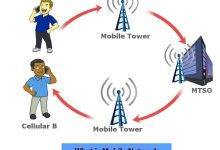
A mobile network is a type of wireless network that enables devices to communicate without fixed cables. It relies on: Generations of Mobile Networks Generation Year Technology Speed Key Features 1G 1980s Analog ~2.4 kbps Voice only, poor security 2G 1990s Digital (GSM, CDMA) ~64 kbps SMS, MMS, better voice quality 3G 2000s UMTS, WCDMA ~2 Mbps Mobile internet, video calls 4G 2010s LTE ~100 Mbps HD streaming, mobile broadband 5G 2020s NR (New Radio) ~10 Gbps Ultra-low latency, IoT, AR/VR Key Characteristics Applications
Local Area Network (LAN) A LAN (Local Area Network) is a computer network that connects devices within a limited physical area — such as a home, office, or school. It allows devices to share resources (files, printers, internet) and communicate at high speed. Key Characteristics Relationship with Wi‑Fi LAN vs WAN Feature LAN WAN Coverage Local area (home, office, campus) Wide area (cities, countries) Speed High (100 Mbps–10 Gbps) Lower, depends on telecom infra Ownership Private, managed locally Shared/public infrastructure Connection Ethernet, Wi‑Fi Fiber, satellite, leased lines
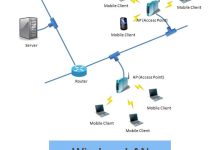
WLAN (Wireless Local Area Network) A WLAN is a type of LAN (Local Area Network) that uses wireless communication (radio waves) instead of physical cables to connect devices. The most common WLAN technology is Wi‑Fi (IEEE 802.11 standard). Key Characteristics Wi‑Fi: Standards, Versions, and History 1. Origins 2. Generations of Wi‑Fi Generation Standard Year Band Max Speed Key Features Wi‑Fi 1 802.11 1997 2.4 GHz 2 Mbps First Wi‑Fi standard Wi‑Fi 2 802.11b 1999 2.4 GHz 11 Mbps Affordable, but interference-prone Wi‑Fi 3 802.11g 2003 2.4 GHz 54 Mbps Faster, backward compatible Wi‑Fi 4 802.11n 2009 2.4 & 5 GHz 600 Mbps Introduced MIMO, dual-band Wi‑Fi 5 802.11ac 2014 5 GHz 1.3 Gbps Beamforming, better streaming Wi‑Fi 6 802.11ax 2019 2.4 & 5 GHz 9.6 Gbps OFDMA,...
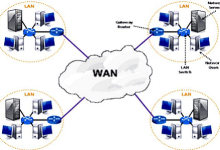
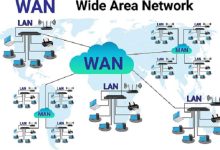
Wide Area Network (WAN) A WAN is a computer network that spans a large geographic area — from cities to entire countries or globally. It connects multiple LANs (Local Area Networks) together, enabling communication and resource sharing across long distances. The Internet itself is the largest WAN. Key Characteristics Examples 4. Challenges WAN vs Internet WAN vs LAN vs WLAN Feature LAN WLAN WAN Coverage Local (home, office, campus) Local, wireless (Wi‑Fi) Wide area (cities, countries) Connection Ethernet cables Wi‑Fi radio waves Telecom lines, satellites, fiber Speed Very high (100 Mbps–10 Gbps) Variable (depends on Wi‑Fi standard) Lower, depends on distance/infra Ownership Private Private Mix of private & public
Metropolitan Area Network (MAN) A Metropolitan Area Network (MAN) is a computer network that covers a city or metropolitan area. It is larger than a LAN (Local Area Network) but smaller than a WAN (Wide Area Network). MANs connect multiple LANs across a city, often using high‑speed fiber optic cables. Key Characteristics Examples LAN vs MAN vs WAN Feature LAN MAN WAN Coverage Building, campus City or metropolitan area Country, continent, global Speed Very high (100 Mbps–10 Gbps) High (hundreds Mbps–Gbps) Lower, depends on distance/infra Ownership Private (home, office) Telecoms, governments, universities Mix of private & public Example Home Wi‑Fi, office LAN Citywide university network The Internet, global corporate WAN
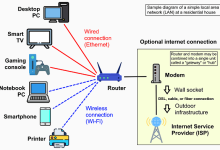
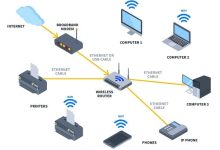
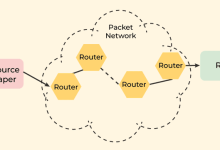
A router is a device that sits at the boundary between networks and decides where to send data packets. It connects multiple IP networks or subnetworks and ensures that traffic flows efficiently. Core Functions Types of Routers Router vs Switch vs Modem Device Role Layer Example Router Connects different networks, directs packets Layer 3 (Network) Home router linking LAN to Internet Switch Connects devices within one LAN Layer 2 (Data Link) Office switch connecting PCs & printers Modem Converts signals for ISP connection Layer 1 (Physical) DSL/cable modem providing Internet
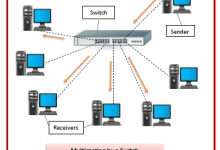
A switch is a networking device that connects multiple devices (computers, printers, servers) within the same Local Area Network (LAN) and forwards data intelligently based on MAC addresses. How It Works Types of Switches Key Functions Switch vs Router vs Hub Device Role Layer Example Switch Connects devices within a LAN, forwards by MAC Layer 2 Office PCs connected together Router Connects different networks, forwards by IP Layer 3 Home LAN to Internet
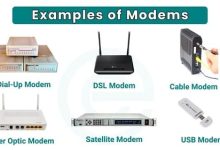
Traditional Meaning A modem (short for modulator–demodulator) is a device that converts signals so your computer or router can communicate with your Internet Service Provider (ISP). Fiber Era: ONT Core Functions Types of Modems Modem vs Router vs Switch Device Role OSI Layer Example Modem Converts signals, connects to ISP Layer 1 (Physical) DSL/cable/fiber modem Router Connects different networks, directs packets Layer 3 (Network) Home router linking LAN to Internet Switch Connects devices within LAN, forwards by MAC Layer 2 (Data Link) Office switch connecting PCs & printers
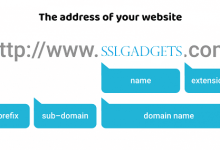
What Is Domain Registration? Governance & Hierarchy Domain Name Space Reserved Domains Certain domains are reserved and cannot be registered:
IP Address Domain Name DNS (Domain Name System) Relationship Between Them Example: Summary
Routing Forwarding Relationship Example Summary
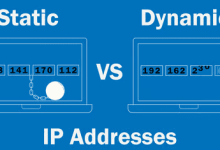
Static IP Dynamic IP Putting It Together Example Summary:
 seseltan