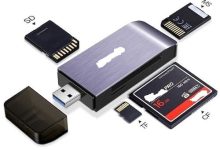
Bridging Memory Cards and Computers A card reader is an input/output device that allows computers to access data stored on memory cards, such as SD, microSD, CF, or other formats. It acts as a bridge between portable storage media and computing systems, enabling quick transfer of photos, videos, and files. Historical Background Architecture and Features Card readers are designed for compatibility and convenience: Types of Card Readers Type Description Single-Format Reader Supports only one type of card (e.g., SD). Multi-Format Reader Supports multiple card types (SD, microSD, CF, MS, etc.). Internal Reader Built into laptops, desktops, or printers. External Reader Portable, connects via USB; widely used for cameras and drones. Professional Reader High-speed readers for photographers and videographers, supporting UHS-II/CFexpress.
Reading and Writing with Light An optical drive is a computer hardware device that reads and writes data using laser light on optical discs such as CDs, DVDs, and Blu-ray discs. For decades, optical drives were the primary medium for distributing software, music, movies, and backups, bridging the gap between digital storage and physical media. Historical Background Architecture and Features Optical drives rely on precise laser technology: Types of Optical Drives Type Description CD-ROM Drive Reads data from CDs; common in early PCs. CD-R/CD-RW Drive Allows recording and rewriting CDs. DVD-ROM Drive Reads DVDs; higher capacity than CDs. DVD±R/RW Drive Records and rewrites DVDs. Blu-ray Drive Supports HD/4K content; very high capacity. Combo Drive Reads/writes multiple formats (CD, DVD, Blu-ray). External Optical...
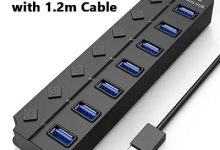
Expanding Connectivity Through a Single Port A USB hub is a device that expands one USB port into multiple ports, allowing several peripherals to connect to a computer simultaneously. It acts as a central point for keyboards, mice, printers, storage devices, and other accessories, making it essential for modern computing where devices often outnumber available ports. Historical Background Architecture and Features USB hubs vary in design but share common elements:
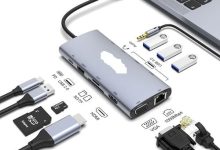
Expanding Laptop Connectivity A docking station is a device that allows laptops or tablets to connect to multiple peripherals and external displays through a single interface. It transforms portable computers into full desktop workstations, providing convenience, efficiency, and expanded functionality. Historical Background Architecture and Features Docking stations combine multiple interfaces into one hub:
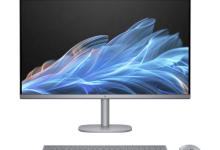
Compact Power in a Single Unit An all-in-one desktop (AIO) is a computer that integrates the monitor and system components into a single unit. Unlike traditional desktops with separate towers and monitors, AIOs save space, reduce cable clutter, and offer a sleek design. They are popular in homes, offices, and educational settings where simplicity and aesthetics matter. Historical Background Architecture and Features All-in-one desktops combine essential components into a streamlined design:
Cloud-Centric Computing Devices A Chromebook is a laptop or tablet running Google’s ChromeOS, designed to be lightweight, affordable, and cloud-focused. Unlike traditional laptops that rely heavily on local software, Chromebooks emphasize web-based applications and cloud storage, making them ideal for education, everyday productivity, and mobile computing. Historical Background Architecture and Features Chromebooks are built around simplicity and cloud integration: Comparison with Other Laptops Feature Chromebooks Windows Laptops MacBooks OS ChromeOS (cloud-focused) Windows (software-rich, versatile) macOS (premium ecosystem) Storage Limited, cloud-based Large local storage Large local storage + iCloud Performance Moderate to high (premium models) Wide range, from budget to gaming High performance, premium only Price Affordable (entry-level models) Wide range (budget to premium) Premium pricing Security Strong, automatic updates Requires antivirus, manual updates...
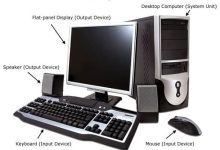
The Traditional Workhorse of Computing A desktop computer is a personal computer designed for regular use at a single location, typically on a desk. Unlike laptops or mobile devices, desktops prioritize performance, expandability, and durability, making them the backbone of both home and office computing for decades. Historical Background Architecture and Features Desktops are modular systems with separate components: Types of Desktops Type Description Tower/Desktop PC Traditional design with separate tower and monitor; highly customizable. Mini PC Compact, portable desktops with moderate performance. All-in-One PC Integrated monitor and system components in one unit; saves space. Gaming Desktop High-performance desktops with powerful GPUs and cooling systems. Workstation Professional desktops optimized for CAD, 3D modeling, and scientific tasks. Home/Office Desktop Affordable, general-purpose desktops for...
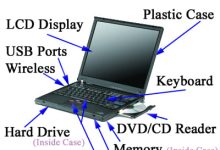
Portable Power for Modern Computing A laptop is a portable personal computer that integrates the display, keyboard, touchpad, and system components into a single compact unit. Designed for mobility, laptops balance performance and convenience, making them the most widely used computing devices today for work, study, and entertainment. Historical Background Architecture and Features Laptops combine portability with essential computing components: Categories of Laptops Category Description Ultrabook Slim, lightweight laptops with long battery life, ideal for professionals. Gaming Laptop High-performance laptops with powerful GPUs for immersive gaming. Business Laptop Durable, secure, optimized for productivity and enterprise use. 2-in-1 Convertible Hybrid laptops with touchscreen and foldable design, usable as tablet. Budget Laptop Affordable models for basic tasks like browsing and word processing. Workstation Laptop...
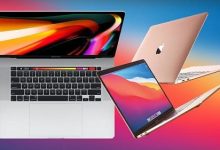
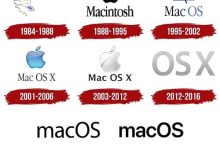
Apple’s Premium Laptop Series A MacBook is Apple’s line of laptops running the macOS operating system, designed to combine portability, performance, and elegant design. Known for their aluminum unibody construction, long battery life, and integration with the Apple ecosystem, MacBooks are positioned as premium devices for students, professionals, and creatives. Historical Background Architecture and Features Types of MacBooks Model Description MacBook (2006–2012, 2015–2019) Standard consumer laptop, discontinued. MacBook Air (2008–present) Ultra-thin, lightweight, focused on portability and efficiency. MacBook Pro (2006–present) High-performance laptop for professionals, available in 13, 14, and 16-inch models. Operating Systems 6.Real-World Example: MacBook Pro 16-inch (M3 Max, 2023)
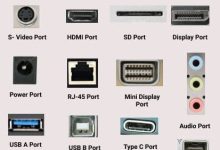
Input/Output Ports Display Ports Storage Interfaces Network Ports Audio Ports Expansion Interfaces (mostly desktops)
Windows Operating System Founders & Origins Historical Evolution Core Features Usage Scenarios Significance Windows transformed computers from specialized tools into everyday consumer products. Its GUI and ecosystem lowered the barrier to entry, enabling millions of people to use PCs easily
Founders & Origins Historical Evolution Architecture Key Features
 seseltan